
Tracking HRV with Garmin Watches
How to enable HRV tracking and analyze the data in SportTracks
We recently announced the ability to manually input Heart Rate Variability (HRV) and Resting Heart Rate (RHR) data into the newly-customizable SportTracks Health page. In addition, HRV data can automatically be included in the .FIT files from specific Garmin sports watches!
If you have access to a Garmin 920XT, 910XT, fēnix 3, or a Forerunner 620, you can start tracking and analyzing your HRV data in SportTracks — but first you need to manually enable the recording of this data on your watch. Instructions are below...
Garmin 920XT, fēnix 3, and Forerunner 620
To enable HRV recording you need to do the following:
- Connect your watch to a computer with the supplied USB cable
- Download this file
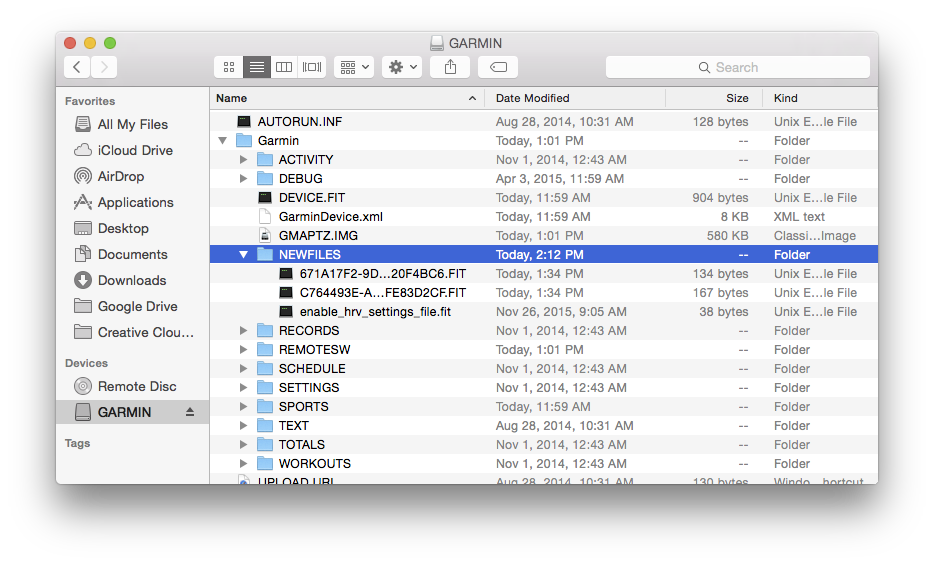
- Put that file (which is named “enable_hrv_settings_file.fit”) into your watch in this folder: :\GARMIN\NEWFILES
- Sync your watch with Garmin Express and disconnect
Garmin 910XT
To enable HRV recording you need to do the following:
- Power up your 910XT
- Press the Menu button
- On the Menu screen, press the Up button then the Down button, and repeat this ten times.
- After pressing Up and Down a bunch of times, the watch will display its Diagnostic Menu. In the top right, select HRV to enable it.
Turning on this feature will eat a little more battery life than usual and make your FIT files noticeably larger, but it’s worth it to reap the benefits of HRV training.
NOTE: Here is a SportTracks blog post that clearly explains the benefits of training with HRV.
HRV App for Garmin Connect IQ
If you have access to a Garmin watch that features Connect IQ, you can download and run the free HRV app, which provides a simple way to test your HRV. However, the HRV data created by this app is not sent to SportTracks for analysis on the Health page. The current Garmin products that are compatible with Connect IQ are the 920XT, 920XTJ, epix, fēnix 3, fēnix 3 HR, the vívoactive, and the D2 Bravo.
Is there another way to measure HRV?
We highly recommend using the excellent HRV4Training app, which is available on iPhone and Android. HRV4Training automatically sends your HRV and RHR (Resting Heart Rate) data to SportTracks, and it utilizes the built-in camera on your phone to take readings, so you don't need to use a heart rate strap.
The instructions for the 910XT were provided by the5krunner.com.
| Article written by Sam Mallery, Director of Marketing, Zone Five Software Inc. |
Comments
Not for the FR630?
If I enable it on my 920 and decide later that I don't need it can I disable it?
Installed on my 920XT, will test today on my lunch-time run.
Rodrigo
Tested on my FR630 and it works. See my notes in the SportTracks FB pace.
How can I activate HRV recording by the diagnostic menu in a FR 630?
This watch has no up'n down buttons.
Is it activated after the sync by default?
Yes, it is activated and showing a first small bar and a value. Don't know how to handle this value but it is another thing to "collect"😉.
There isnt a Newfiles folder on my fenix 3. Can you please check what folder I should use or should I create it?
Its a 'hidden folder' - so you need to enable these to be viewed in the explorer menu.
Great, that helped. Another question, that might seem obvious, but I'm not sure. Is it automatically in the fit file when doing a excersize and the watch told you how far you are from baseline or do I need to do the stess test OR the HRV app from the IQ store.
It also works with the Epix.
I wonder, tough. My HRV from the runs is much lower than the HRV that I measure first thing in the morning. Is the HRV score while running of any use?
I added the file to my Fenix 3 New Files directory and synced. I have done two runs since then.
Now what? I don't see an HRV metric in the Sportscks mobile health page. I attempted to customize the page but I don't see any way to add this metric.
Is this only available in the full website?
More details on how to view the metric would be appreciated.
when I tap on the gear in the health page all I get are a series of blue boxes with arrows next to them. It doesn't look like we even have the ability to modify the metrics on the Health page.
Somehow I managed to add another blue box but when I tap in it's gear, the whole page flashes but nothing happens. I think the interface is broken.
Follow the simplay instructions Keith.
Go back to your health page and you should find 2 boxes at the bottom with nothing in them. Click on the Gear icon in the right hand corner of the box. This takes you to the Value page with a drop down filled with amongst other things, the HRV and Resting HR choices.
Hope this helps.
Can the HRV data be imported to SportTracks through syncing with Garmin Connect? Or do I have to import a FIT file from my watch?
I have a Garmin Fenix 3HR and enabled it. I yesterday also bought the iPhone app. The values differ a lot. Is there a way to disable the Garmin HRV as I want to stick with the iPhone app as I like the way it works
Files from the "new files" directory get moved to other places after restarting so the file is not there anymore. I also looked in all other directories but it is not the same name any more or removed. So that does not work.
Got the same problem. Did you sort this out? Thanks
I asked but no response yet (they tend to be slow). I have done a complete factory reset on the watch and it does not measure and report HRV now. Is there a way to delete the HRV measurements from the watch from your database and only keep the HRV app?
I have a Garmin Fenix 3 HR and have folloved your instructions above. "Installed" the FIT-file on my F3HR and installed the HRV app on my F3HR - https://apps.garmin.com/en-US/apps/d2df9c80-32d5-4063-acb5-360f2b1ebaea
All synced after installed.
Took a test yesterday and got a successful reading of my HRV using my cheststrap to F3HR.
However I am not successful in syncing my data to SportTracks. No value shows up.
Anyone capable of giving some guidance on this issue?
Thanks for your input.
I have done all your bullpoints listed, but still no HRV values.
Will try again in a few hour to see if the values from the new test shows up
Ok. That was a major clarification. Does this mean that the HRV app is not necessary to collect HRV data?
Hi, I have enabled HRV on my Garmin Forerunner 620. But how do you want me to track? Just as part of my runs...or measuring when resting? BRG Michael
Thanks for quick reply! I have Samsung/Android, I bought ithlete and ordered their finger sensor - hopefully you will get the integration, so we Android users can enjoy Sporttracks equal. Thanks
/Michael
Hi! Is there a way to filter data by device/source? Well, my Garmin 920XT records HRV data during actvities and I use HRV4Training in the morning. Due to different scale of both values (approx. factor 10) data/graphs are quite "useless". If I could filter by device/source I could see e.g. HRV4Training data only which would give "better" results. Thank! Olly
I am now using the HRV4Training app and get my HR and HRV data in SportTracks. This is great.
But SportTracks has a couple of old bad HR measurements in this database, which give me a strange chart.
How can I delete those?
Thanks
I have a Garmin FR 630 and have enabled the HRV recording as described in this article through the 'hack'. I can see it's working when I directly upload the file from my FR630 to SportTracks Mobi, but normally I am using ST3 and then synchronize with SportTracks. In that scenario I cannot find my HRV data anywhere and it also does not show up in SportTracks, so I am wondering if there is anything I can do within ST3 to store and use the HRV data in there.
Any support / feedback would be very welcome.
I enabled HRV training on my 735XT putting that file into the new files path. Additionally I installed HRV4 and sync it with Sporttracks.
There is one big issue: There seems to be a factor 10 between the data Sporttracks.mobi gets from the watch (the values are at about 80...) and HRV4 (at about 8, which should be correct).
Any ideas?
Additionally: is there a way to erase the HRV functionality from the 735XT without resetting the watch (so that I could use HRV4 stanalone)? There was a suggestion for a solution that I should delete the file from 'Newfiles', but there isn't a file in that path any more....
Thank you for an answer in advance,
best regards, Axel
Any Ideas?
Question, my account is being populated with HRV data from measurements on my forerunner 935, I've been doing the HRV test on the watch, but also have HRV recording enabled for the activities. Is it possible to tell where the sportracks data is coming from? The Garmin HRV test, unfotunately, only gives a report on a 1-100 scale, doesn't seem to expose any actual details to the end user.
(I'd been using the HRV4Training app prior to this, which is a great app - but using the watch is a little more convenient.)
I'd like to understand the tracked data in detail. When I print a training's FIT file in php, I find an array hrv with data for each second of the activity. For each second there are five data entries. Does anybody know the meaning of these five values?
Pages