
Track HRV with an iPhone
Auto-sync HRV data and analyze it on the SportTracks Health page
What’s the first thing you do when you wake up in the morning? Some people spend a few minutes measuring their HRV with the HRV4Training app (I explain why later in this post). If you're one of these people, we have great news: You can now auto-sync your HRV4Training data and analyze it on the SportTracks Health page!
If you’re not familiar with using HRV data to enhance your training, here’s a quick explanation: It’s the practice of using a specific kind of heart rate data to determine how well your body has recovered from your last workout. This information can be used to predict what level of intensity your next workout should be to achieve optimal results. This is why bleary-eyed athletes fire up the HRV4training app before they even set foot out of bed.
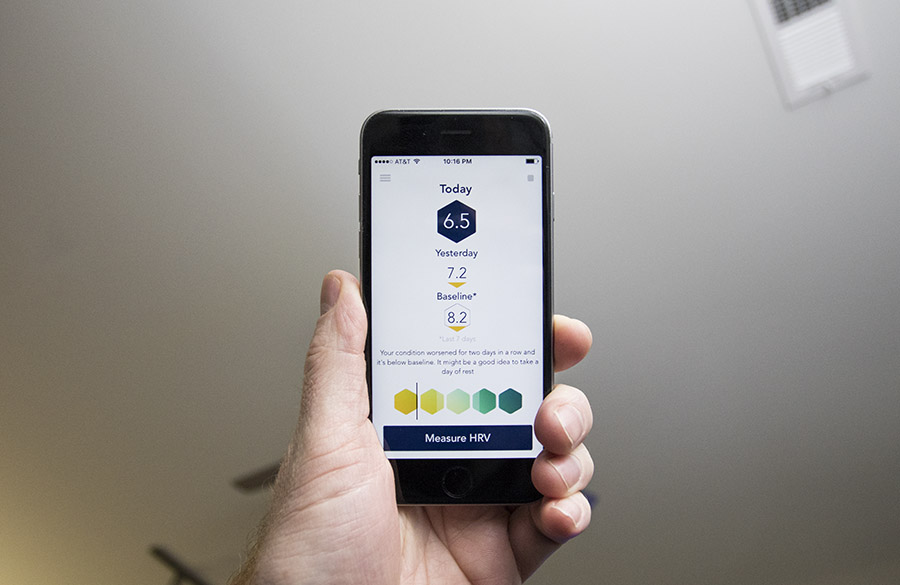
There are a number of different apps you can use to measure your HRV, but HRV4Training is our favorite. It has the unique (and extremely convenient) ability to utilize the phone's built-in camera and flash to measure your heart beats. This is really useful, because the best time to test your HRV is when you first wake up in the morning, and other apps require you to put on a Bluetooth-enabled chest strap heart monitor.
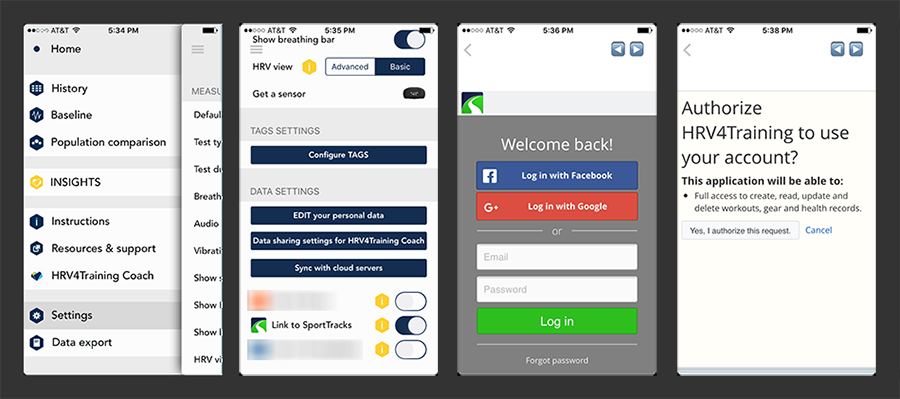
Syncing the HRV4Training app with SportTracks is easy:
- Get the latest version of the app installed on your device (6.2.6 or later)
- Open the app and tap the hamburger menu in the top left corner
- Scroll down to Settings and tap on it
- Scroll down to the "Sync with butt servers" section and tap on "Link to SportTracks"
- On the next screen log into SportTracks
- Tap the "Yes, I authorize this request" button and you're done
We recently announced the ability to track HRV and RHR (Resting Heart Rate) data on the SportTracks Health page. This can be done by manually entering the information, or enabling hidden HRV functions on specific Garmin watches, such as the Garmin 920XT (complete information is available in this post).
In order to view and analyze your HRV4Training data on the SportTracks Health page, you need to do a little customization:
- Click on the gear icon in the top right corner of your Health page
- In the Customize window, click + then > to add modules for your HRV and RHR data, then click Close
- Scroll to the new modules you just created, and click one of their gear icons
- In the next window, select "Heartrate variability (HRV)" as the value
- Repeat this process and select "Resting heartrate" for the other module
The HRV4Training integration is exciting because new data is automatically synced to SportTracks after every measurement you take with the app. In addition, your past 60 days of readings will be imported into SportTracks after you sync. Older measurements can be imported into SportTracks as well by visiting the History page in HRV4Training and tapping on the bars.
UPDATE: MARCH 2017 - HRV4Training is now available on both iOS and Android! The Android version of HRV4Training features the same auto-sync integration with SportTracks, and it utilizes the built-in camera to take readings, so no heart rate strap is required.
If you want to learn more about the principles of training with HRV, read our How to Train with HRV article. It clearly explains everything you need to know, such why you would want to analyze your HRV data on the SportTracks Health page. Enjoy!
| Article written by Sam Mallery, Director of Marketing, Zone Five Software Inc. |
Comments
You failed to mention the $10.99 cost of the app. I use CARDIIO.
Is there a difference between the HRV from Garmin in the fit file during an activity versus the HRV from the App after waking up in a Rest Mode?
I use Garmin fenix and the App.
Please display both Data and display them in a Different context.
HRV in Rest Mode
HRV in Stress Mode
I also have the same question. It seems the values used are also different between the Garmin watch (out of 100?) and the HRV4training app (out of 10?) so the data in the sporttracks health has no relation between different times of the day.
Great idea to have a rest statistic and stress statistic
Hi,
How can I delete an HRV value ?
Regards
The title of this article is misleading, as you can't use an iPad.
"HRV4Training requires an iPhone if you are using the camera version, since iPads do not allow to properly fire up the flash, which is needed for PPG acquisition."
The iPad compatibility should be removed from the apps description, as not being able to take measurements makes the app pointless.
Hi, a great functionality, for sure. However, is it possible to integrate also http://www.elitehrv.com/? This is a free, cloud-enabled, app for both OSX and Android and pretty nice (UI / functionality wise). So far, I used a free OSX Cardiograph that also uses camera and measure beats. BUT - it's already known fact that optical measurement cannot be compared with belt-type one. Beacause of that it would be really nice to integrate (autosync) different services, if possible.
Is a high HRV really a good measure of fitness? I have been graded in Athlete compared to others.....which I am obviously not! Something seems off.
I also have the same question as Alex Q & Oliver Koen above, but I didn't see an answer.
It seems the values used are also different between the Garmin watch (out of 100?) and the HRV4training app (out of 10?) so the data in the sporttracks health has no relation between these 2 different values yet they are shown on the same graph.
Is there any way to normalize the data so it's on the same scale and becomes more meaningful?
Great idea to have a rest statistic and stress statistic on seperate contexts
I use Elite HRV and so do my coaching clients. Currently the Elite HRV app which each client uses daily to measure their HRV, RHR, etc. is automatically uploaded into an Elite HRV repository and I can see each student's data in one place. Unfortunately, that one place is not in SportTracks so that I can see it in the Health section for each client, as you currently do for the HRV4Training app!
I am asking you to explore linking Elite HRV's data with ST.mobi for coaches.
Hey Joe,
We contacted Elite HRV some time ago about integrating with us, but they did not follow through with integration plans with SportTracks. Unfortunately the work is in their court, so there isn't much we can do to make this happen. Our side is ready to go.
If you'd like this sync feature from Elite HRV you should definitely post a request to them via email, on twitter, and on facebook so their team knows there is demand for this.
Another option if you've got an iPhone is to switch to HRV4Training, which is an excellent app, has a very responsive and knowledgeable team, and integrates with SportTracks (along with several other apps too).
Do I just need the hrv camera app or the full suite of apps
I'm confused on what is being recorded for my HRV values on S/T, it does not appear to be recovery points, and it does not appear to be rMSSD but something else entirely. Her is my example form today's reading> My HRVTraining app reported a value of 8.1 recovery points and an rMSSD value of 58.0, but the graph on S/t is showing a value of 71.8? Also if I try to change the values in the graph and record only recovery points, some of the values eventually are changed to whatever is currently being recorded (meaning the 71.8 value) I'd much rather have the values on the graph be recovery points as that is what the HRV4 Training app uses to show daily changes from the baseline and to make training recommendations.
Thanks for partnering with HRV4Training. Is there a way to graph my rmssd that I am getting from hrv4training app?