
Tracking HRV with Garmin Watches
How to enable HRV tracking and analyze the data in SportTracks
We recently announced the ability to manually input Heart Rate Variability (HRV) and Resting Heart Rate (RHR) data into the newly-customizable SportTracks Health page. In addition, HRV data can automatically be included in the .FIT files from specific Garmin sports watches!
If you have access to a Garmin 920XT, 910XT, fēnix 3, or a Forerunner 620, you can start tracking and analyzing your HRV data in SportTracks — but first you need to manually enable the recording of this data on your watch. Instructions are below...
Garmin 920XT, fēnix 3, and Forerunner 620
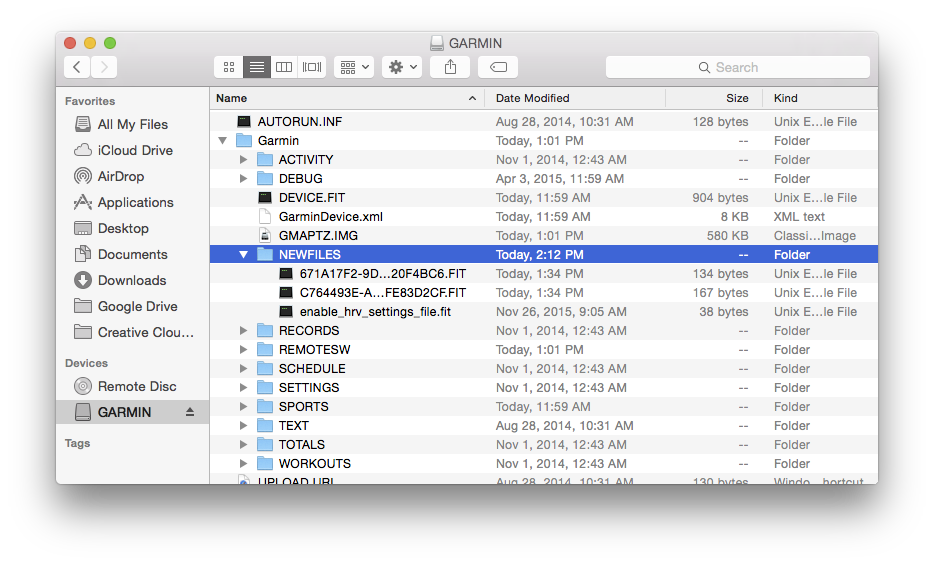
To enable HRV recording you need to do the following:
- Connect your watch to a computer with the supplied USB cable
- Download this file
- Put that file (which is named “enable_hrv_settings_file.fit”) into your watch in this folder: :\GARMIN\NEWFILES
- Sync your watch with Garmin Express and disconnect
Garmin 910XT
To enable HRV recording you need to do the following:
- Power up your 910XT
- Press the Menu button
- On the Menu screen, press the Up button then the Down button, and repeat this ten times.
- After pressing Up and Down a bunch of times, the watch will display its Diagnostic Menu. In the top right, select HRV to enable it.
Turning on this feature will eat a little more battery life than usual and make your FIT files noticeably larger, but it’s worth it to reap the benefits of HRV training.
NOTE: Here is a SportTracks blog post that clearly explains the benefits of training with HRV.
HRV App for Garmin Connect IQ
If you have access to a Garmin watch that features Connect IQ, you can download and run the free HRV app, which provides a simple way to test your HRV. However, the HRV data created by this app is not sent to SportTracks for analysis on the Health page. The current Garmin products that are compatible with Connect IQ are the 920XT, 920XTJ, epix, fēnix 3, fēnix 3 HR, the vívoactive, and the D2 Bravo.
Is there another way to measure HRV?
We highly recommend using the excellent HRV4Training app, which is available on iPhone and Android. HRV4Training automatically sends your HRV and RHR (Resting Heart Rate) data to SportTracks, and it utilizes the built-in camera on your phone to take readings, so you don't need to use a heart rate strap.
The instructions for the 910XT were provided by the5krunner.com.
| Article written by Sam Mallery, Director of Marketing, Zone Five Software Inc. |
Comments
A typical data entry looks like this (for t=3060s):
[3060] => Array(
[0] => 0.407
[1] => 0.407
[2] => 65.535
[3] => 65.535
[4] => 65.535
)
The first two value are RR distances in seconds, but which meaning do the other three values have? Are they placeholders or some arbitrary values when there are no further RR distances in this time interval?
Pages